Seidio Rubberized Case and Holster for Treo 700W


 |
| View full album |
After a good bit of effort, I think I finally have my Today screen how I want it (at least for now). The problems with the Treo 700W is it's small screen. I like to have a lot of information and the room just isn't there. Also, I still find the usability of the PIM apps in Windows Mobile lacking compared to the easy of Palm OS. With my old Palm, I could whip it out to check my calendar or to do list with ease. I still find the Treo a bit rough in this regard.
Because of these 2 things, I've worked to try to get my today screen configured such that it would provide better access to PIM information and also show all the information I wanted it to.
Here are some screen caps and an explanation of what software and tweaks I'm using. This is the primary screen for showing necessary phone info.
1) Custom background - simple black BMP with a small Clemson tiger paw inserted at the lower right.
2) Magic Button - http://www.trancreative.com/mb.aspx
This free software is responsible for all the little icons at the top to the right of the Start menu. This is a simple little task switcher which allows me to use the menu bar as a task switcher. The icons represent the apps that are currently running.
3) PocketBreeze - http://www.sbsh.net/products/pocketbreeze/
The second row is the control row for this software. It is a Today screen plugin which allows one to show and use PIM data as well as add custom tabs for showing other plugins. All the space below this second row is being used for the different tabs of Pocket Breeze. The current tab, represented by the second icon from the right, is running PhoneAlarm (more below). The other tabs, from right to left, are for Agile Messenger, PhoneAlarm, PocketWeather, Tasks, and Calendar. Except for the Agile Messenger tab, which is just for instant messaging and is used rarely, I'll show each of these tabs below.
4) PhoneAlarm - http://www.pocketmax.net/phoneAlarm.html
This app adds a lot of functionality to the phone part of the device. It supports profiles and repeating alarms, neither of which is available with the phone by default. The Today screen plugin is skinnable and very customizable. I'm using the Joel_Box_Clear skin which shows bluetooth status, SMS, email, missed calls, voicemail, profile switching, signal strength, memory percentage, and battery. The various items can be selected to open or activate them.
5) The typical line which shows the carrier information has been removed to provide more room using the Remove Logo tool. This is the calendar tab which is pulling data from Pocket Outlook. This is highly customizable allowing you to view your data almost any way you can imagine. I have it set to show appointments for the next 2 days. The small colored bars to the left indicates the category the item is associated with. A pop-up monthly calendar can be shown by hitting the icon in the top left. The data can be filtered by category by tapping the button labeled All.
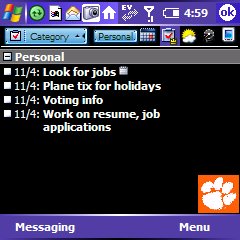 This is the To-Do tab. It also can show your data about any way you might like. I have it currently filtered to just show the Personal items. Tapping on the Personal button allows filtering by other categories.
 Finally, this is the weather tab running PocketWeather. It can be highly customized as well. I have it showing the forecast for 3 different cities which are shown in separate tabs.
Well, that's my today screen for now. I'm sure it will be ever changing as I seek to make it perfect for my uses.
I had heard of Microsoft Exchange, but I didn't know anything about it until recently. As it turns out, it provides an awesome solution for keeping email and other PIM(personal information management) data in sync on multiple systems.
I found myself using 2 different computers as well as a Treo. Checking the same email 3 times seemed stupid and I was always worried I'd sync something wrong and mess up all my data. Microsoft Exchange solves this problem by managing all the info on a centralized server for all your systems to access. This software is expensive and difficult to manage so is typically used in corportations and such. It's not typically a personal solution. That's where www.4smartphone.net steps in. There are other solutions such as www.mail2web.com, but 4smartphone supplied the right balance of features and price for what I wanted. These services offer hosted Exchange services for personal or business use. They handle all the software and servers. For $6.99/month, 4smartphone keeps all my computers synced up and they even threw in a free copy of Outlook 2003. This covers the price for a year of service just by itself.
So now, if I check email on the laptop, read an item, and maybe put it into a certain folder, I'll see it as read and tucked into a folder when I check mail again on the Treo or my desktop. No more looking at the same mail 3 times. Or I can add a task or calendar entry on any device and the other 2 see that change also. AWESOME! Also, it's kinda weird, and I'm not exactly clear on how this works, but you don't have to initate a send/receive in Outlook anymore. It just updates anytime there's something new on the server. Apparently, the Exchange server notifies the clients that are logged in anytime there's a change and pushes that change out. On the Treo, Activesync is used to connect to the Exchange server in the same way. Everything is automatic and pushed to the different devices.
I have found this to work wonderfully and highly recommend it.
I use 3 computers regularly.... a work laptop, a home desktop, and a Treo. I've been trying for awhile now to get all my email and PIM info synced on all 3 at all times. I've got everything in Outlook but still haven't found the perfect solution. I switched from POP to IMAP a few days ago. That's a big help with email. Now I'm trying hosted exchange server with www.4smartphone.com. It looks promising so far, and there's a 15 day free trial. What do I have to lose??
For some reason when you send a text message on the 700W it has to let you know when it sends it. So it pops up a little notification and beeps. I hit send; therefore I assume it was sent. I don't want to have to clear the notification every time. Well here's a little registry hack I found to make it stop this nonsense.
Disable:
HKLM\Software\Microsoft\Inbox\Settings\SMSNoSentMsg = 1 (DWORD decimal)
Enable:
HKLM\Software\Microsoft\Inbox\Settings\SMSNoSentMsg = 0 (DWORD decimal)
Thanks to ebedoun over at TreoCentral discussion forums! http://discussion.treocentral.com/showthread.php?t=120680

I've been trying to find a good car mount for my 700W. First I bought one off eBay that looked just like the Boxwave Mobile Mounting Kit. It was just a knockoff that didn't work. Cheap junk. Next I bought the Boxwave because it looked great. There were 3 things I didn't like about this.
1) Small suction cup would not hold. Any amount of heat would not allow this to stay on the windshield.
2) Short bottom feet to hold device.
3) Vibration from gooseneck.
Today I received the iGRIP Global Swivel Mount purchased from ExtremePDA.
So far this is great, but I'll only know after using it a bit whether it will stay put on the windshield. Things I like....
1) Large suction cup - this should hold, at least I hope so. I've already found that it will not hold at all in areas where the windshield is slightly curved.
2) No gooseneck. Very stable mount with 2 axis adjustment knobs.
3) Smooth release mechanism - squeeze arms to hold device, press button to release
4) Long, adjustable feet - these will still hold the device when released, they can slide in and out so you can access the ports on the bottom, can also be moved to opposite side
5) Reversible - move the feet to the other side and rotate it 90 degrees and the arms are lower, this keeps them from pressing the side buttons on the Treo
To be honest, I can't really think of any negatives yet, except for its need for perfectly flat windshield.
I've had my 700W back since Sunday and I think I've finally settled on a device. It's not perfect. Sometimes it locks up or is slow to respond. But I really like how many things it can do in one package. I'll try to review it in detail eventually.
Different devices for different people
There isn't one perfect device out there. There's certainly not one device that can do everything and do it all well. It's a matter of figuring out what you need your device to do and finding the one that can handle all that as well as possible. The more capabilities you cram in, the more compromises you'll be forced to make.
You'll notice that my bro recently got the Nokia 6682 smartphone. I went with the Treo 700W. These phones have different capabilites but fit our different needs(wants) in a device.
Yeah, they took it back. Still had my old 700W in the back so they just replaced them. Felt bad though; pretty sure the CS guy wasn't too happy with me. I'll try to leave him alone for good now though.
So it really came down to the lack of multitasking and poor web browsing on the 700P that killed it. I know these weren't at the top of my usability list, but I can't stand having something that didn't work completely. Also, if I decided to ditch the data plan with Verizon and just use wifi, that option did not exist on the 700P.
I'm restoring everything to the 700W now. Sprite Backup is a lifesaver although strangely it didn't backup my email, settings, and old text messages. Weird but no biggie. Also, I think the P probably changed some stuff in Outlook, but I'll sort that all out with time.
Disappointed.
I had hoped this was really the cure for my woes. Nope. I find that multitasking is sorely missed after using Windows Mobile for a few months. Something about Palm OS feels very confining. It sure is fast though. That's a nice change.
Now what? I can hope that verizon will let me come back in and have the used 700W I left there today.
Problems with 700P
-no multitasking
-poor speakerphone volume
-some websites don't work
-slow internet, webpages render funny
-limited fonts
-wifi options not currently available
The good with 700P
-fast
-PIM apps fast and simple
-BT seems a little better
-good screen
The problems with 700W
-runs out of memory
-screen backlight delay sometimes
-gets sluggish and non-responsive from time to time
-PIM apps complicated, surely there must be a good replacement out there somewhere
The good with 700W
-excellent multitasking, except when memory gets low
-web access is perfect
-streaming audio works great, more standard
-excellent TXT/Email program, works great switching between them
Back home to Palm OS that is. I just got back from Verizon after exchanging the 700W for the 700P. They were kind enough to do this even after 27 days.
So after nearly 3 months and 3 Windows Mobile devices(Dell Axim X51V, Verizon XV6700, Palm Treo 700W), I'm back to Palm OS again. I sure hope I find myself happy with this device. More details later.
What are the pros and cons of each as related to my needs?
700W Pros
-multitasking
-handles TomTom well
-Today screen
-excellent email/text messaging
700W Cons
-lack of RAM, causes multitasking woes
-unreliable, just stops working properly from time to time
-PIM apps are terrible
-backlight delay sometimes
700P Pros
-higher resolution screen
-excellent PIM apps!!!!
-maybe stability and reliability
-just faster probably
700P Cons
-no multitasking
-no WiFi support
I'll come back and edit this as I think of more.
Eh.
That pretty much sums it up, but I'll give a little more detail.
Cons
- The range is still not significantly better than my Jabra BT250. It seems that in general the BT 2.0 devices have a little better range but not enough to justify all the cost.
- The ear loop is not tight enough. This is one of those that flops around way too easily. Irritating.
- The in-ear indicator beeps aren't as distinct as on some other headset.
Pros
- Solid voice quality on both ends of the conversation.
- Same charger as the Treo. That's kinda convenient, but still you have to carry 2 chargers when traveling if you want to charge them both at the same time.
Well it doesn't look good, but I'll try it for a couple days. At this point I'm thinking about just going back to my old headset. We'll see.
Ok, it's Wednesday and the new headset is here. I've got it charging and should be able to test it in a couple of hours. I'll report the results later tonight. Boy, I sure hope this solves my headset woes.
One complaint so far, and this applies to a lot more than this particular headset. Why do manufacturers insist on using this sealed, hard plastic packaging? I understand it as a theft-protection device. There's no way someone could slip a small headset or flash memory card or whatever out of one of these and into their pocket in the store. However, these things can't be opened period! Why must they punish those of us who actually made the purchase?! There is no easy way to open it without destroying the packaging, and there's always the danger of cutting yourself on the plastic. Someone out there, please design better packaging for items like this!
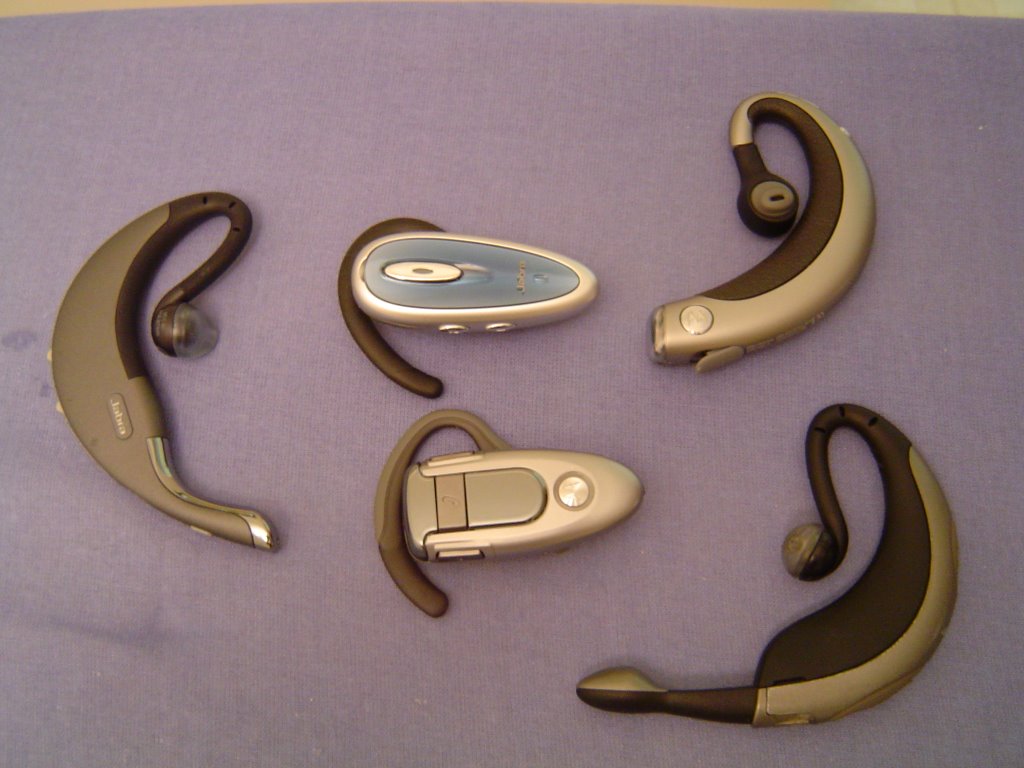
I'll start with the current device issue and later try to catch up with past devices. I'm currently trying to find a bluetooth headset that works well with the Treo 700W. As it turns out this isn't an easy task. The bluetooth radio on the Treo is known to be weak. I hoped that moving to BT 2.0 would give better clarity and range. We'll see. These are the ones I've tried....